Black Friday load testing verifies that your infrastructure can handle expected and above-expected traffic before high-traffic days such as Singles' Day (11.11), Black Friday and Cyber Monday. The goal is not just to stay online, but to keep checkout fast and uninterrupted when the campaign goes live. Testing should start at least four weeks before the event, so there is time to fix what you find.
Holiday shopping by the numbers
November is the month ecommerce infrastructure faces its toughest test of the year. The figures below show the scale of campaign-day traffic and how directly speed affects sales.
| Indicator | Value | Source |
|---|---|---|
| US Black Friday online spending (2025) | $11.8 billion | Adobe Analytics |
| US Cyber Week online spending (2025) | $44.2 billion | Adobe Analytics |
| US online holiday spending, Nov 1 – Dec 31 (2025) | $257.8 billion, up 6.8% year over year | Adobe Analytics |
| Türkiye ecommerce volume (2025) | $115.4 billion; ~6 billion transactions | Turkish Ministry of Trade (ETBİS) |
| Türkiye's busiest ecommerce day (2025) | Nov 11: 0.79% of the year's transactions (an average day: 0.27%) | Turkish Ministry of Trade (ETBİS) |
| Impact of page speed on conversion | A B2C ecommerce site that loads in 1 second converts 2.5x higher than one that loads in 5 seconds | Portent (2022) |
Taken together, the numbers say two things: campaign-day traffic is enormous, and even a few seconds of slowdown at that scale turns directly into lost revenue.
Four risks that set campaign traffic apart
During holiday campaigns, problems rarely come from a single bug. They come from several systems straining at the same time.
| Risk | What happens on campaign day | Business impact |
|---|---|---|
| Sudden traffic surge | Traffic multiplies within minutes of launch. | Pages slow down or become unreachable; sales are lost. |
| Concurrent checkout and inventory flows | Cart, coupon, inventory and payment services are hit at once. | Orders are abandoned mid-checkout; call center load rises. |
| Third-party dependencies | Payment, shipping, recommendation and promotion services take load too. | Even if your own system holds, the slowest service drags down the whole flow. |
| Distributed user traffic | Traffic arrives from many cities and networks at the same time. | A test run from a single location does not reflect production. |
Peak testing vs stress testing: which one, and when?
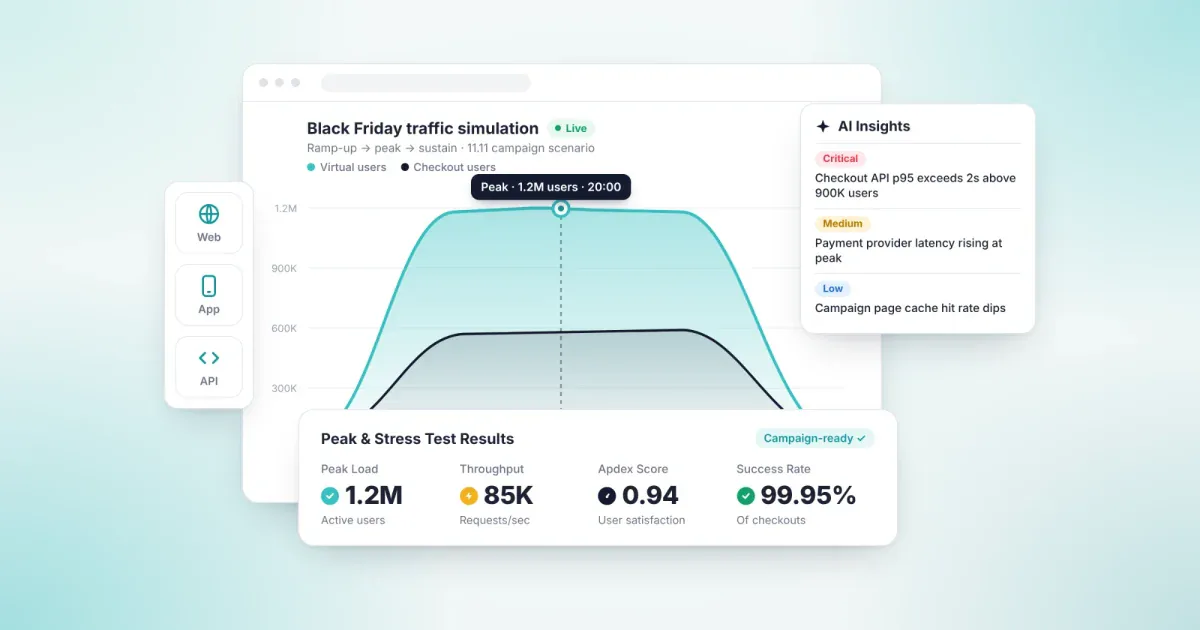
Campaign readiness uses three test types together: one covers the first minutes of the campaign, one the load above expectations, and one the load that lasts all day.
| Test type | What it measures | What it means for the campaign |
|---|---|---|
| Peak (spike) testing | How the system reacts to a sudden surge in traffic | The first minutes after the campaign goes live |
| Stress testing | The breaking point beyond capacity, and recovery | Demand above forecast, or a slow downstream service |
| Endurance (soak) testing | Stability under high load sustained for hours | A day-long campaign; memory and connection build-up |
How to build a campaign scenario and set a test target
A realistic load test does not hammer a single page; it mirrors the customer journey on campaign day. Your scenario should reflect how users spread across flows.
| User flow | Example share | Why it matters |
|---|---|---|
| Home and campaign landing pages | 40% | Tests caching and content delivery. |
| Search and category listings | 30% | Stresses the search service and database queries. |
| Product detail pages | 15% | Tests inventory and pricing services. |
| Add to cart and coupons | 10% | Stresses sessions, carts and promotion rules. |
| Checkout | 5% | Tests the payment service and third-party integrations. |
Shares are illustrative; take yours from last campaign's analytics.
To set the target, start from last campaign's peak concurrent users, then add expected growth and a safety margin. For example, if last year's peak was 20,000 concurrent users and you expect 30% growth, a 50% safety margin gives a test target of 39,000 concurrent users. Define acceptable response times and an Apdex target alongside your SLAs. That way, the test answers not "did the system survive?" but "what did customers experience at launch time?"
Six metrics to watch on campaign day
Track the same metrics during testing and on campaign day, so production behavior can be compared directly with test results.
| Metric | What it shows | Why it matters |
|---|---|---|
| Response time (p95) | The time within which 95% of requests complete | Averages hide your slowest users; p95 surfaces them. |
| Error rate | Share of failed requests | Shows the load level at which errors begin. |
| Apdex score | User satisfaction on a scale from 0 to 1 | Translates technical results into leadership language. |
| Throughput | Requests or orders processed per second | Shows how much work the system actually completes. |
| Concurrent users | Number of users active at the same time | Shows how close you are to target. |
| Infrastructure resources | CPU, memory and database connection pool usage | Pinpoints which layer is the bottleneck. |
Five common load testing mistakes
- Testing only the home page. The home page is usually served from cache and holds up; problems surface in dynamic flows such as cart, coupons and checkout.
- Generating load from a single location. When all traffic comes from one data center, the network and CDN layers are never realistically tested.
- Using unrealistic test data. Empty carts, a single coupon code or a handful of products do not reflect campaign-day data volume.
- Ignoring third-party services. If payment and shipping services are left out, the weakest link shows up on campaign day. These services need a sandbox or coordination with the provider.
- Not retesting after fixes. Fixing the first bottleneck exposes the next one. Plan at least two test rounds.
A four-week load testing plan
For Singles' Day (November 11), Black Friday (November 27, 2026) and Cyber Monday (November 30, 2026), build the plan backward from campaign day.
- 4 weeks out · Set the target. List last campaign's peak traffic, how users spread across flows, and your third-party dependencies. Set targets for concurrent users, response time and Apdex.
- 3 weeks out · Run the first peak and stress tests. Run the scenario with real traffic profiles from multiple regions and identify bottlenecks.
- 2 weeks out · Fix and repeat. Once bottlenecks are resolved, rerun the same scenario and compare results with the first round. Add the endurance test this week.
- 1 week out · Final check. Freeze the campaign release and run a final peak test. Share the metrics and thresholds to watch on campaign day with the team.
- Campaign day · Monitor. Track the six metrics live and keep a response plan ready for when thresholds are crossed.
- After the campaign · Record. Compare real traffic data with your test scenarios; this sets the target for your next campaign.
If you have less than four weeks left, compress the plan: run your first peak and stress test now, fix the bottlenecks and rerun within a week at the latest, then run a final peak test before the release freeze.
A ready infrastructure does not mean the campaign will work on the customer's phone. We cover how to test campaign screens and QR, location and shake-to-win flows on real devices in Mobile App Testing Before Black Friday.
Load testing with Loadmance
Loadmance · AI-Powered Performance Testing · Load · Stress · Peak · Resilience
With Loadmance, you design campaign scenarios in a visual editor and import your existing JMeter and Postman scenarios. Load is generated from distributed cloud infrastructure across multiple geographic regions, simulating real user behavior. Results are reported with Apdex scores and SLA targets, and real-time telemetry is monitored throughout the test. Performance tests connect to your CI/CD pipeline, so every campaign release is validated against the same standard.
Frequently asked questions
When should Black Friday load testing start?
At least four weeks before the campaign. The first test usually finds a bottleneck, and fixing and retesting takes two to three weeks.
How many concurrent users should we test with?
Start from last campaign's peak concurrent users, then add expected growth and a safety margin. In stress testing, go beyond that target to find the system's limit.
What is the difference between peak testing and load testing?
Load testing measures performance at expected user volume. Peak testing shows how the system reacts to a sudden traffic surge, which is exactly what happens when a campaign goes live.
Should load testing be done in production?
Main tests run in a staging environment configured as close to production as possible. If a production test is needed, run it during low-traffic hours, coordinated with the relevant teams and third-party providers.
How do you test third-party services such as payment providers?
Use the provider's sandbox or simulate the service's behavior. Get the provider's approval before sending load to a live payment service.
What is the difference between Singles' Day and Black Friday?
Singles' Day (11.11) began in China and has grown into a global shopping event. Black Friday is the day after Thanksgiving in the US and, with Cyber Monday, anchors the holiday shopping season. In many markets, including Türkiye, the two have merged into a month-long November campaign period.
Go into November with tested infrastructure.
Let's review your campaign scenarios together with Loadmance. Contact us
Sources: Adobe, 2025 holiday season press release (Jan 7, 2026) · Turkish Ministry of Trade, E-Commerce in Türkiye Report 2025 · Portent, Site Speed is (Still) Impacting Your Conversion Rate (2022)