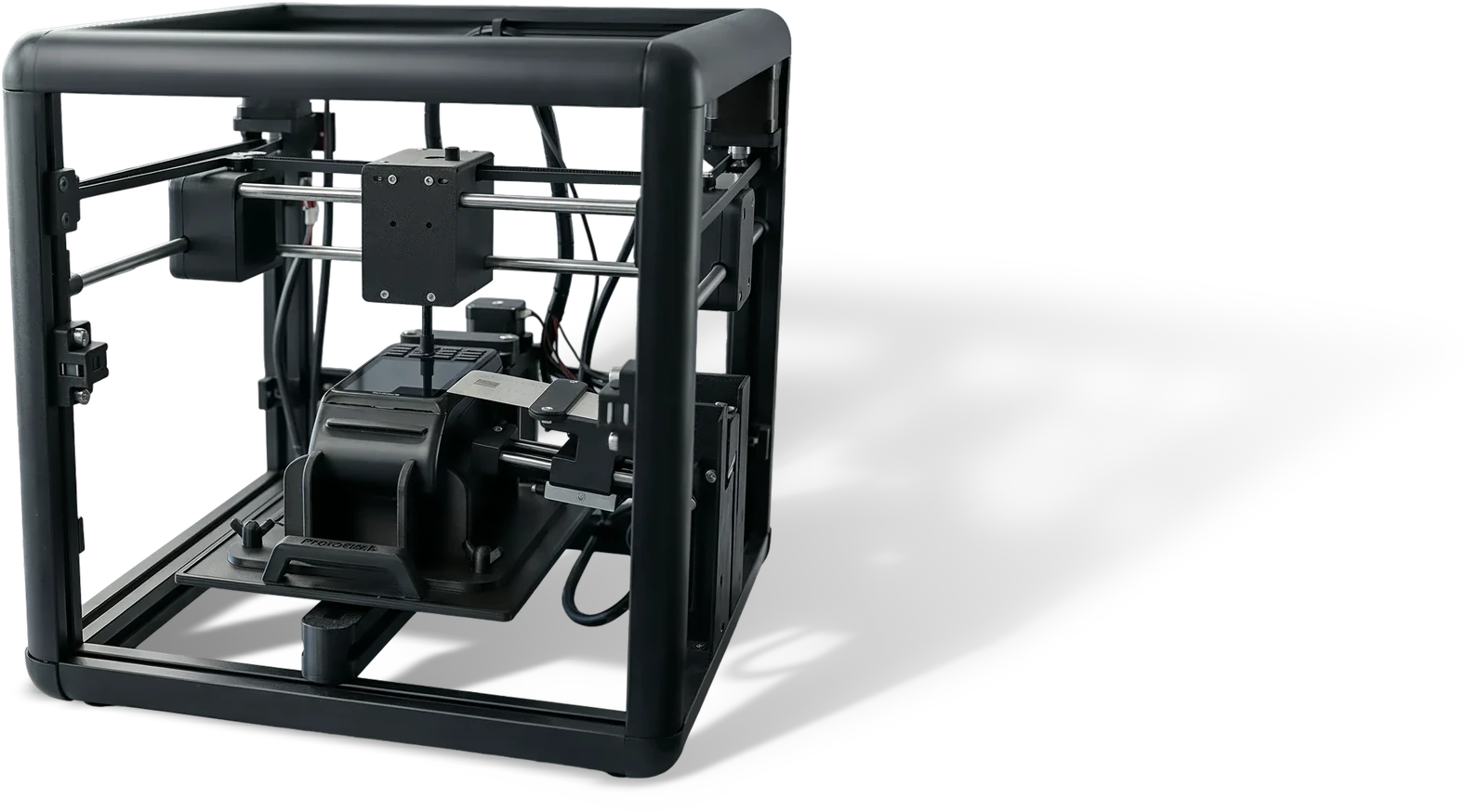
Roboclick is an innovative test platform that end-to-end automates the testing processes of POS and SoftPOS devices combining robotic control, image processing (OCR), and AI-powered analysis technologies.
Movement control across the X, Y and Z axes performs physical key presses and touch interactions. The test runs on a real device without human intervention. The layer an emulator cannot see, NFC contact, touch response, screen latency, comes into coverage.
Screen validation through image processing
Output on the device screen is read through optical character recognition and compared against the expected result. No operator has to sit and watch: amounts, messages and status information are validated automatically.
AI-powered analysis and prioritisation
Results are assessed through AI-powered analysis, and critical scenarios are brought forward based on what changed in the code and on historical defect data. In a limited test window the riskiest flows run first, and critical scenarios are not missed.
Certification evidence generation
A screenshot, a step log and a result record are archived automatically for every run. The file you can present as evidence in certification and internal audit processes is ready without a separate preparation period.
Visual scenario design
Scenarios are built in a visual editor using ready-made step blocks such as card read and PIN entry. Writing code is not mandatory, and the QA team can produce scenarios without developer support.
CI/CD integration
Device tests connect to your DevOps pipeline. Physical testing stops being an island outside the software release flow.
With Roboclick, you test your POS and SoftPOS devices without depending on manual capacity.
How it works
1
Scenario design
Define the transaction flows to be tested in the visual editor. Steps such as card read, PIN entry and receipt validation are built from ready-made blocks.
Who is it for?
Banking
Banks that build their own card and payment infrastructure and work to a certification calendar.
Fintech and payment institutions
Teams that need to bring new payment experiences to market quickly across a wide range of devices.
POS manufacturers and integrators
Manufacturers and solution partners that must validate many device models against the same scenarios.
Retail chains
Chains that must prove the same payment flow works across thousands of points of sale.
Aviation and transport
Operations that need to validate in-cabin and mobile sales terminals, including offline scenarios.
When to use it
While developing a new POS or SoftPOS deviceIn regulatory and certification testingIn bank and fintech integration projectsFor critical payment flow validation before a releaseWhen adding a new model to the device fleet
What Changes?
With Old Methods
With Roboclick
Manual testing dependent on an operator
Operator-free execution through robotic automation
Results that vary from run to run
Standardised, repeatable test flows
Checking the screen by eye
Automatic validation through optical character recognition
A test window limited to office hours
Uninterrupted overnight execution
Critical scenarios slipping through
AI-powered test prioritisation
Collecting certification evidence by hand
Automatically generated, recorded evidence files
Built for high-risk digital environments.
Proven experience in industries where the cost of a performance failure is highest.
Roboclick is used with physical POS terminals and with devices running SoftPOS applications. Because the robotic arm calibrates screen and keypad position, the same scenarios can be run across different brands and models. Device scope is agreed together during setup.
How long does it take to get started with Roboclick?+
Setup begins with positioning the test station and calibrating the first device. Getting the first scenario set running typically takes a few days. Adding a new device model is completed by repeating the calibration step; you do not need to rewrite the scenarios.
Who writes the test scenarios? Is coding knowledge required?+
Scenarios are built in a visual editor using ready-made step blocks such as card read and PIN entry. Writing code is not mandatory. Parameterised scenarios can be defined for more complex flows, and the QA team can produce scenarios without developer support.
Can it be used in certification processes?+
Roboclick produces a screenshot, a step log and a result record for every run. These outputs are structured to be used as evidence in certification and internal audit processes. Acceptance criteria vary by certification body, so scope is defined together within the project.
What is SoftPOS testing and why is it difficult?+
SoftPOS means accepting payment on a smartphone or tablet rather than on a dedicated terminal. Testing it is difficult because both the software and the physical interaction, NFC contact, touch input, screen output, have to be validated. Roboclick automates that physical layer through robotic control and optical character recognition.
References
Move device testing onto a robotic line
Complete the form and we will discuss your device fleet, your certification calendar and your manual testing workload. We will identify which scenarios can be executed robotically and the time that would free up.