
If you're working in an Agile team, creating an effective bug report is critical to the success of your project. In this blog post, we'll explain step by step how to create a clear and understandable bug report in Jira.
What is a Bug Report and Why is it Important?
A bug report is a document that describes a detected problem in detail and guides the development team. A well-prepared bug report ensures that the issue is resolved quickly and effectively.
Steps to Create a Bug Report in Jira
1. Issue Type Set the issue type as "Test-Defect".
2. Summary Write a title that includes the platform (Mobile or Web) and a brief description of the problem.
3. Components Add the project's analysis, design, and software teams and the name assigned by the company.
4. Description Detail this section under three subheadings:
- Environment: The project's URL, stage (test, stage, production), and capacity
- Use Case: Explain step by step how the error occurred
- Expected Behavior: Define how it should work correctly
5. Acceptance Criteria Specify the conditions necessary for the issue to be considered resolved.
6. Priority Classify the issue according to its importance:
- Critical-Blocker
- High
- Medium
- Low
7. Label Add project-specific labels (e.g., Project_Name_Test, Project_Name_Automation, Project_Name_Bug).
8. Attachments Add photos and video recordings. We recommend using TechSmith Capture.
9. Assignee Assign to the person who opened the bug report.
10. Main Team Specify your Agile team's name.
Bug Report Lifecycle
- After creating the record, set it to "To-review" status.
- When development is complete, move it to "QA" status.
- Based on test results: If successful: Add evidence and move to "Done" status with "Tested & Passed" comment. If unsuccessful: Add evidence, move to "Reject" status with "FAILED" comment, and assign to the relevant developer.
Jira Workflow:
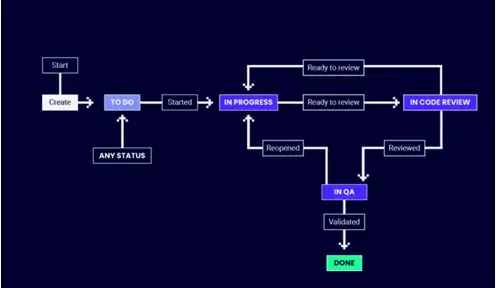
Conclusion An effective bug report increases the efficiency of your Agile team and improves the quality of your project. By following these steps, you can help your team resolve bugs quickly and accurately.
By following this guide, you can start creating excellent bug reports in Jira. Remember, good communication and detailed documentation are the foundation of a successful Agile project.
Author: Aylin Kaymaz